The IDE built for learning,
not just coding
A browser-based development environment designed for education — with AI assistance, zero setup, and seamless course integration.
Everything you need, right in the browser
No installation, no config files, no "it works on my machine." Open your assignment and start coding in seconds.
Zero setup
Open your browser. Your full dev environment is ready — no installs, no PATH issues, no Docker to configure.
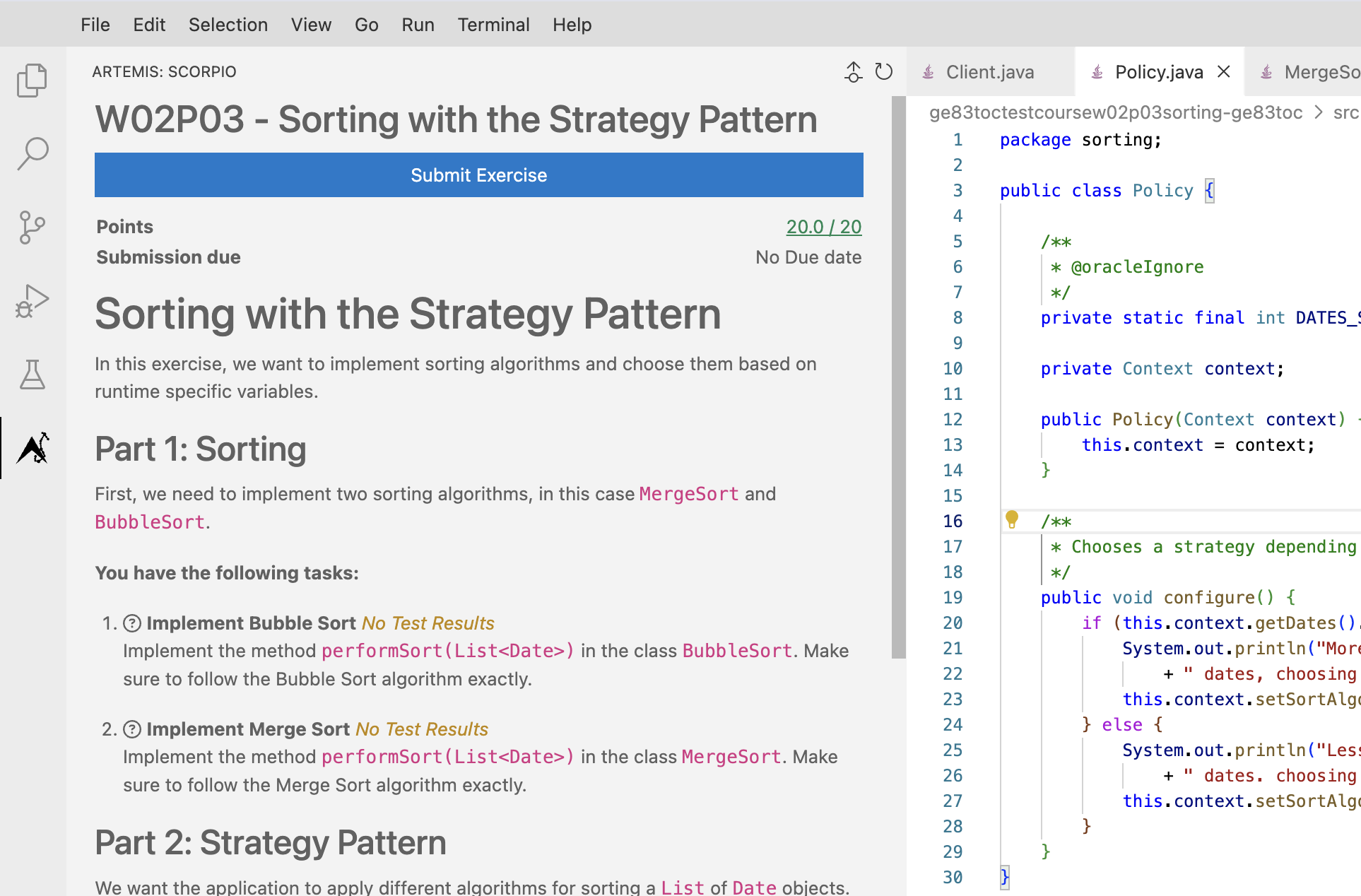
Assignment integration
Assignments appear directly in the IDE. Submit without switching tabs or manually uploading files.
Consistent environments
Every student runs identical toolchains. What works for you works for the grader — every single time.
One click to build, test, and run
Pre-configured tasks let students run, build, and test their code without memorizing commands. Instructors define the workflow once and students only need to click on Run.
Submit without leaving the IDE
The integrated submission extension connects directly to Artemis. Students commit and submit their work in one step — no file uploads, no copy-paste, no switching tabs.
An AI-powered terminal that teaches.
No more decoding cryptic logs. When a build fails, the AI terminal assistant provides instant explanations and guided fixes. It helps students master syntax and understand build outputs in real-time.
This is an upstream contribution to Eclipse Theia and requires student-side LLM configuration.
Ready-to-code environments
We provide pre-configured Cloud IDEs with full toolchain support and LSP-powered editing right out of the box.
Enjoy seamless syntax highlighting, autocompletion, and real-time error detection without any setup.
 Java
Java Python
 C
C JavaScript
 OCaml
OCaml Rust
RustSet up a full IDE for your class in minutes.
No IT tickets. No setup emails. Students open a link and they're ready. You stay focused on teaching.
One-click course setup
Define the environment once within Artemis. Every student gets an identical, pre-configured workspace with no need for manual replication.
Automated grading pipeline
Integrated with Artemis for test-based grading. Student submissions run against your test suite automatically.
No "works on my machine" tickets
All runtimes, dependencies, and configs live server-side. Support tickets about setup drop to near zero.
Built in the open, giving back upstream
EduIDE is built on Eclipse Theia and developed openly at TUM. Everything we learn, we share with the community and the platform.

Built on a Professional Foundation
EduIDE is built on Eclipse Theia, the same robust, open-source framework behind many professional cloud IDEs. Through our close collaboration with EclipseSource, we leverage a highly scalable foundation and actively contribute our educational extensions back to the upstream community.
Visit theia-ide.orgReady to try EduIDE?
Open the IDE in your browser. Or deploy it for your next course in minutes.